Mike - Your Mic, Your Rules
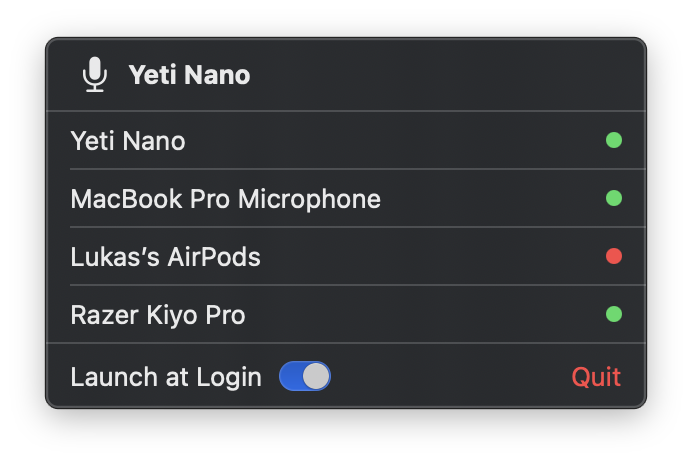
I built a tiny macOS menu bar app that keeps your preferred microphone active... finally. While working from home is nice and all, there is one thing that has been driving me absolutely insane: macOS resetting my default microphone. Every. Single. Time. Dock the laptop, and suddenly I'm on the built-in mic. Wake from sleep, built-in mic. Toggle the KVM switch, you guessed it. And it never happens before the meeting starts - it's always mid-sentence, followed by the dreaded "hey, you sound different, are you on your laptop mic?". After one too many of those moments, I figured I'd just build something to fix it. And so Mike was born - a tiny macOS menu bar app that enforces a user-defined microphone priority list. The idea is dead simple: you rank your mics in the order you prefer them, and Mike makes sure the highest-priority connected mic is always the system default. Plug in your good mic? Mike switches to it. Unplug it? Mike falls back to the next best option. macOS tries to override your choice after waking from sleep? Mike overrides it right back. Mike sits quietly in your menu bar and listens for CoreAudio device changes. Whenever something changes - a device connects, disconnects, or macOS decides to mess with your default - Mike runs through your priority list and picks the best available mic. No polling, no timers, just event-driven reactions. The whole thing is built with Swift and SwiftUI, targeting macOS 14+. Zero third-party dependencies. The CoreAudio interactions are behind a protocol, so the core logic is fully testable with mock hardware. The priority engine itself is a pure function - give it a list of preferred UIDs and a list of connected devices, and it tells you which one to use. That's it. A cat icon (in honor of a neighborhood cat called Mike) appears in your menu bar, you can right-click to reorder your mics, and you never think about it again. Truth be told, this is one of those projects where the problem is so small and specific that you question why this isn't just built into MacOS already. But after using it for a while now, I can't imagine going back. It's one of those "set it and forget it" utilities that just quietly does its job. The source code is on GitHub. MIT licensed, enjoy. The Problem
The Solution
How It Works
Install
brew install --cask spissable/tap/mike
Closing Thoughts